Case study
Streaming App
A self-hosted media streaming web app for discovering and playing movies and TV shows from user-configured sources.
Technology
- TypeScript
- React
- Node.js
- Express
- Tailwind
- Role
- Sole developer
- Year
- 2026
- Status
- In active use
Context
A streaming experience I could control
I was tired of repeatedly searching for third-party streaming sites that would disappear, become overloaded with ads, or offer an inconsistent experience. Instead of replacing one temporary site with another, I decided to build a personal interface that I could control.
The result is a self-hosted app for discovering and watching movies and TV shows through one consistent browsing experience, while keeping the playback provider separate from the interface itself.
The system
Separating metadata, playback, and the interface
The React and Vite frontend handles the complete browsing experience, while a focused Express API acts as a bridge to TMDB. Keeping those requests on the server protects the TMDB key and gives the frontend normalized data for search, artwork, cast information, trailers, seasons, episodes, collections, and recommendations.
Playback is provider-neutral. The backend generates movie and episode embed URLs from a single STREAM_SOURCE environment variable, which means I can replace a provider that stops working without rewriting the frontend.
The app does not download, store, or proxy video files. Its responsibility is to provide the discovery interface, normalize metadata, and connect the selected title to the configured playback source.
Interface
A desktop-first browsing experience
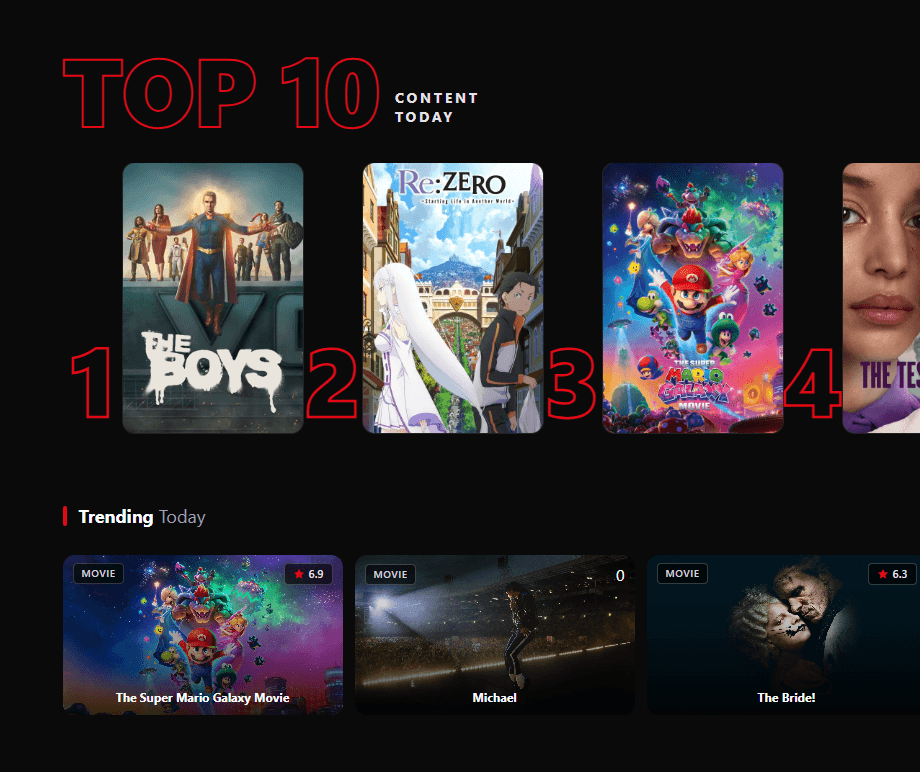
The home screen uses a full-width featured title and artwork-led content rows to make discovery feel closer to a dedicated streaming service than a collection of external links.
Main challenge
Making a content-heavy interface feel cinematic
The external integrations were intentionally straightforward; most of the work went into making the app feel cohesive and polished. I built an artwork-led home page, discovery rows, search, detailed title and actor pages, season and episode browsing, trailers, recommendations, and a full-screen player as one connected experience.
The challenge was less about one difficult algorithm and more about maintaining a clear visual hierarchy across a large amount of content. Artwork came in different shapes, titles varied in length, metadata could become dense, and each screen still had to remain usable across desktop and smaller displays.
That meant treating spacing, typography, image sizing, navigation depth, responsive rows, and player transitions as parts of the same system rather than polishing each screen in isolation.
Deployment
Private and self-hosted
The app runs on a Raspberry Pi behind a firewall and is limited through network access rules to my own use. That keeps the deployment private while giving me direct control over the application, its configuration, and the selected playback provider.
Self-hosting also made the project a practical part of my own setup rather than only a local development exercise.
What I learned
Polish comes from consistent decisions
Building the app taught me that polish in a media interface comes from consistency across many small decisions: artwork sizing, text contrast, loading behavior, responsive rows, navigation depth, and keeping controls understandable as the amount of content grows.
It also helped me get better at using visual hierarchy to guide attention without allowing artwork or metadata to overwhelm the interface. The experience had to feel cinematic, but it still needed to remain clear, predictable, and easy to browse.